Not that we really had any privacy, but at least you "hoped" comapnies would at least respect that your emails and personal data were, well, personal.
NOT anymore.
UPDATE 9-4-13: UPDATE. Looks like it was taken out of context.
Wednesday, August 14, 2013

Sunday, August 11, 2013
Not the Internet I envisioned
Lavabit has shutdown due to pressure from the government. Read the article HERE. That article also mentioned Silent Circle shutting down their email service as well.
The last couple months have been a very sad time for the Internet. The NSA is grabbing everyone's internet traffic without warrants and bullying ISP's and corporations for everything from phone conversations to encryption keys. In some cases they want ISP's to give them passwords for users.
The NSA is saying they only touch (whatever that means) 1.6% of internet traffic. READ.
Mega says they are going to OFFER and encrypted email service.
This is not the Internet i envisioned when I first got online in the mid 90's. It was a wondrous place filled with adventure and amazing new things. For the most part people were willing to help, everything was free and no advertisements.
As it got more popular you had people doing bad things on it, but like every good tool, it could be used for bad. I don't think the internet needs governments capturing all data on everyone. This does not make us more secure. It makes us more of a target. Especially for false allegations. We are becoming a police state and what disappoints me even more is that no one seems to care.
I am hoping that the true internet community will find ways to keep us anonymous and evolve encryption so that is is easier to implement in things like emails and IM. I wish i was a programmer and I would do what I could to help.
Another program that was just released is TORTILLA. I have not been able to get it to work on my system yet, but its an add on to TOR that will allow all TCP/IP and DNS traffic through TOR.
Tuesday, August 6, 2013
TOR Bundle Comprimised
It looks like TOR Bundle was COMPRIMISED.
To be clear, the TOR network itself was not compromised. It looks like a server was exploited to send malware to a version of the TOR Bundle (it uses firefox) that had a vulnerability in firefox.
To be clear, the TOR network itself was not compromised. It looks like a server was exploited to send malware to a version of the TOR Bundle (it uses firefox) that had a vulnerability in firefox.
Wednesday, July 24, 2013
Saturday, July 6, 2013
Raspberry Pi NOOBS
It's been a while since I've talked about the RPi and it looks like they've made some great changes when installing the OS.
Previously you had to download a Raw OS image. This would entail you having to use dd (Linux) or Win32DiskImager (Windows) to "burn" the image to an SD card for booting.
Now, the team at RPi has come up with NOOBS (New Out Of Box Software). This is fantastic. Especially for users who may not feel comfortable with dd or Win32DiskImager.
Pretty much all you need to do is format an SD card, download the NOOBS file and then unzip it to the SD card and then boot it up and install the OS. Let's look at each step:
STEP 1 - Format SD Card
Download SD Formatter 4.0 from www.sdcard.org.
Install the software on your computer and then run the program. (Make sure your SD card is already plugged in)
Find the drive letter for your SD card (Mine was D:, but yours might be different) and format the SD card. I used Full Erase and Format Size Adjustment Off.

STEP 2 - UNZIP NOOBS to the SD card
Once you format your SD card all you need to do next is unzip the NOOBS_v1_2_1.zip directly to the drive letter of your SD card (In my case D:\). I use winrar and a screen shot is below:
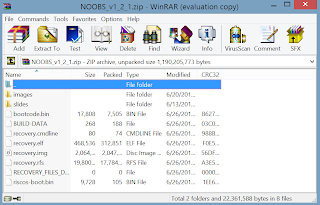
I clicked Extract To and then in the screen that comes up I selected my D:\ drive.
When you extract to your SD card it will take several minutes.
STEP 3 - Boot from SD card and install OS
After you extract the files to your SD card, safely remove the SD card from your computer and put it in the RPi.
Power on your Pi and you will get a screen that looks similar to the below screenshot (I got this image from the raspberrypi.org site):

At this point all you need to do is select which OS to install. Currently I am running Raspbian to get used to it. However, if time allows i will install each one to see what the differences are.
Here is a good comparison of the OSs, even though a couple are not included in the new NOOBS.
My next project is to either hook this up to my A/C thermostat or a weather station.
Enjoy.
Previously you had to download a Raw OS image. This would entail you having to use dd (Linux) or Win32DiskImager (Windows) to "burn" the image to an SD card for booting.
Now, the team at RPi has come up with NOOBS (New Out Of Box Software). This is fantastic. Especially for users who may not feel comfortable with dd or Win32DiskImager.
Pretty much all you need to do is format an SD card, download the NOOBS file and then unzip it to the SD card and then boot it up and install the OS. Let's look at each step:
STEP 1 - Format SD Card
Download SD Formatter 4.0 from www.sdcard.org.
Install the software on your computer and then run the program. (Make sure your SD card is already plugged in)
Find the drive letter for your SD card (Mine was D:, but yours might be different) and format the SD card. I used Full Erase and Format Size Adjustment Off.

Once you format your SD card all you need to do next is unzip the NOOBS_v1_2_1.zip directly to the drive letter of your SD card (In my case D:\). I use winrar and a screen shot is below:
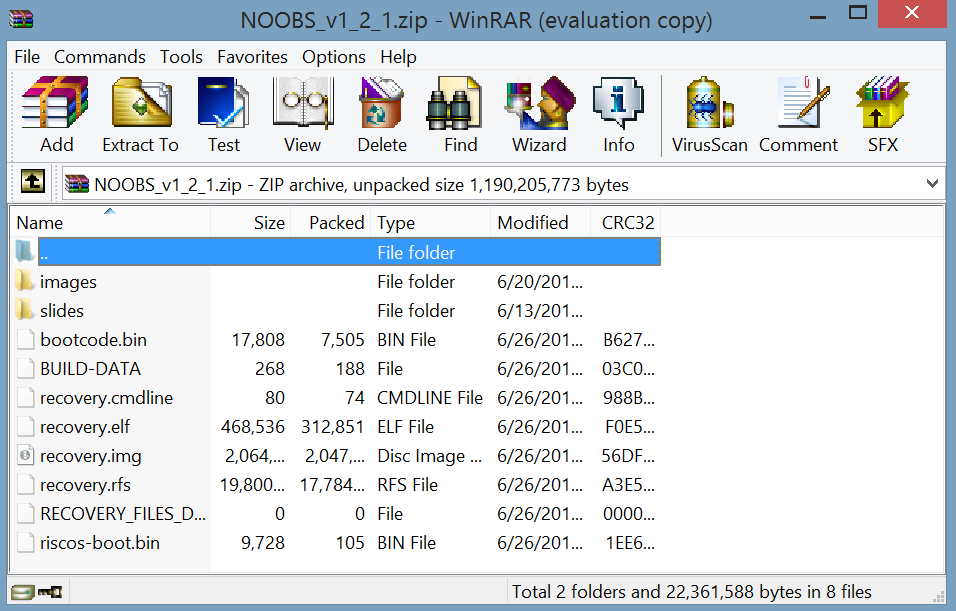
I clicked Extract To and then in the screen that comes up I selected my D:\ drive.
When you extract to your SD card it will take several minutes.
STEP 3 - Boot from SD card and install OS
After you extract the files to your SD card, safely remove the SD card from your computer and put it in the RPi.
Power on your Pi and you will get a screen that looks similar to the below screenshot (I got this image from the raspberrypi.org site):

At this point all you need to do is select which OS to install. Currently I am running Raspbian to get used to it. However, if time allows i will install each one to see what the differences are.
Here is a good comparison of the OSs, even though a couple are not included in the new NOOBS.
My next project is to either hook this up to my A/C thermostat or a weather station.
Enjoy.
Friday, June 14, 2013
Single user Mode in Ubuntu
When you go into recovery mode it will only mount the file system as Read Only. What you will need to do is edit the startup boot line to read rw init=/bin/bash at the end.


Monday, June 10, 2013
How to Install Hyper-V Tools using PowerShell
I'm testing Windows 2012 and Hyper-V just to see what it has. I installed the trial version of Hyper-V (no GUI and only the Hyper-V service) on a server and then installed windows Server 2012 on another server to remotely manage it.
I was able to add the Hyper-V server to the Server Manager, however I couldn't get the Hyper-V Manager installed. I was even going in to Roles and Features. I then found the below to get me the Hyper-V Manager.
I was able to add the Hyper-V server to the Server Manager, however I couldn't get the Hyper-V Manager installed. I was even going in to Roles and Features. I then found the below to get me the Hyper-V Manager.
Get-WindowsFeature Hyper-V*
Install-WindowsFeature Hyper-V-Tools
Install-WindowsFeature Hyper-V-PowerSHell
Get-WindowsFeature Hyper-V*
I added the two computers to the same domain so I didn't have to add a local administrator account and then run a bunch of crazy PowerShell scripts to trust
Subscribe to:
Posts (Atom)